


Page 73 - CSS
P. 73
•  border-top-left-radius


            •  border-top-right-radius

            •  border-top-style


            •  border-top-width

            •  border-width


        Examples


        border-radius


        The border-radius property allows you to change the shape of the basic box model.


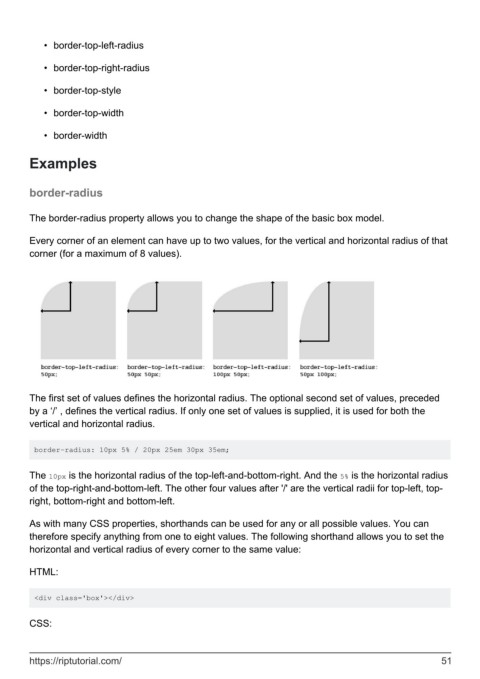
        Every corner of an element can have up to two values, for the vertical and horizontal radius of that
        corner (for a maximum of 8 values).


        The first set of values defines the horizontal radius. The optional second set of values, preceded
        by a ‘/’ , defines the vertical radius. If only one set of values is supplied, it is used for both the
        vertical and horizontal radius.


         border-radius: 10px 5% / 20px 25em 30px 35em;


        The 10px is the horizontal radius of the top-left-and-bottom-right. And the 5% is the horizontal radius
        of the top-right-and-bottom-left. The other four values after '/' are the vertical radii for top-left, top-
        right, bottom-right and bottom-left.


        As with many CSS properties, shorthands can be used for any or all possible values. You can
        therefore specify anything from one to eight values. The following shorthand allows you to set the
        horizontal and vertical radius of every corner to the same value:

        HTML:


         <div class='box'></div>


        CSS:


        https://riptutorial.com/                                                                               51

