


Page 107 - CSS
P. 107
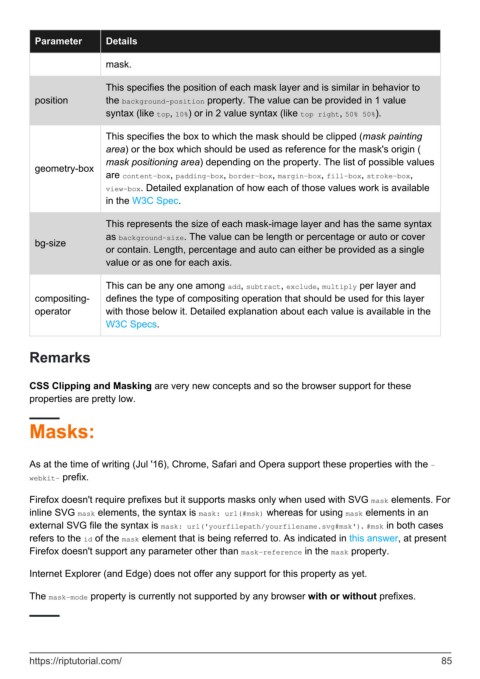
Parameter        Details

                           mask.


                           This specifies the position of each mask layer and is similar in behavior to
          position         the background-position property. The value can be provided in 1 value
                           syntax (like top, 10%) or in 2 value syntax (like top right, 50% 50%).

                           This specifies the box to which the mask should be clipped (mask painting
                           area) or the box which should be used as reference for the mask's origin (
                           mask positioning area) depending on the property. The list of possible values
          geometry-box
                           are content-box, padding-box, border-box, margin-box, fill-box, stroke-box,
                           view-box. Detailed explanation of how each of those values work is available
                           in the W3C Spec.


                           This represents the size of each mask-image layer and has the same syntax
                           as background-size. The value can be length or percentage or auto or cover
          bg-size
                           or contain. Length, percentage and auto can either be provided as a single
                           value or as one for each axis.


                           This can be any one among add, subtract, exclude, multiply per layer and
          compositing-     defines the type of compositing operation that should be used for this layer
          operator         with those below it. Detailed explanation about each value is available in the
                           W3C Specs.


        Remarks


        CSS Clipping and Masking are very new concepts and so the browser support for these
        properties are pretty low.


        Masks:


        As at the time of writing (Jul '16), Chrome, Safari and Opera support these properties with the -
        webkit- prefix.


        Firefox doesn't require prefixes but it supports masks only when used with SVG mask elements. For
        inline SVG mask elements, the syntax is mask: url(#msk) whereas for using mask elements in an
        external SVG file the syntax is mask: url('yourfilepath/yourfilename.svg#msk'). #msk in both cases
        refers to the id of the mask element that is being referred to. As indicated in this answer, at present
        Firefox doesn't support any parameter other than mask-reference in the mask property.

        Internet Explorer (and Edge) does not offer any support for this property as yet.


        The mask-mode property is currently not supported by any browser with or without prefixes.


        https://riptutorial.com/                                                                               85

